

How to Add Binance Smart Chain (BSC) to Fox Wallet: A Complete Guide for Crypto Users

Introduction: Connecting Fox Wallet to the Binance Ecosystem
Fox Wallet, known for its robust security and user-friendly interface, has become a favorite among cryptocurrency enthusiasts for managing Ethereum-based assets. However, to tap into the vast world of decentralized applications (dApps), affordable transactions, and popular projects on the Binance Smart Chain (BSC), you need to add this network manually. This comprehensive guide will walk you through every step of adding BSC to your Fox Wallet, ensuring you can explore the full spectrum of the crypto universe from a single, secure application. Whether you're looking to trade on PancakeSwap, invest in new BEP-20 tokens, or engage with GameFi projects, connecting your wallet is the essential first step.
Understanding Binance Smart Chain and Fox Wallet Compatibility
Before diving into the setup process, it's crucial to understand what you're connecting. Binance Smart Chain is a parallel blockchain to Binance Chain, designed for smart contract functionality and compatibility with the Ethereum Virtual Machine (EVM). This means wallets like Fox Wallet, which support EVM-based chains, can easily interact with BSC. Fox Wallet's architecture allows for the addition of custom RPC (Remote Procedure Call) networks, making it perfectly suited for BSC integration. This compatibility unlocks access to a network known for its high speed and low transaction fees, a compelling alternative for users tired of Ethereum's gas price volatility.
Step-by-Step: How to Add Binance Smart Chain to Fox Wallet
The process is straightforward and can be completed in under two minutes. First, ensure you have the latest version of Fox Wallet installed on your mobile device. Open the app and navigate to the main wallet screen. Look for the network selection button, typically located at the top of the interface—it may display "Ethereum Mainnet." Tap on it to open the network management menu. Here, you will see an option to "Add Network" or "Custom RPC." Select this to manually input the BSC network details. Accuracy is key here, as incorrect information can lead to lost funds. The required parameters for the mainnet are: Network Name: Binance Smart Chain; RPC URL: https://bsc-dataseed.binance.org/; Chain ID: 56; Symbol: BNB; Block Explorer URL: https://bscscan.com. Double-check each entry, save the network, and switch to it. Your Fox Wallet is now connected to BSC.
Adding BSC Testnet for Safe Practice and Development
For users who wish to experiment with dApps or developers testing their smart contracts without risking real funds, adding the BSC Testnet is highly recommended. The process is identical to adding the mainnet, but with different parameters. In the custom RPC section, input the following: Network Name: BSC Testnet; RPC URL: https://data-seed-prebsc-1-s1.binance.org:8545/; Chain ID: 97; Symbol: tBNB; Block Explorer URL: https://testnet.bscscan.com. You can obtain free testnet BNB from official faucets to practice transactions, swaps, and interactions with testnet versions of popular dApps. This sandbox environment is an invaluable tool for learning and development before committing real capital.
Managing BEP-20 Tokens and Assets in Your Fox Wallet
Once BSC is added, your wallet address remains the same, but you now have a new tab or section for BSC assets. Initially, you will only see your BNB balance. To add other BEP-20 tokens (the token standard on BSC, analogous to ERC-20 on Ethereum), you need to import them. Find the "Add Token" or "Import Token" function within the BSC network view. You can search by token name or, more reliably, paste the official token contract address. Always verify contract addresses from the project's official website or BscScan to avoid scam tokens. After adding, your token balances will appear, allowing you to send, receive, and monitor your BSC portfolio alongside your Ethereum assets seamlessly.
Essential Security Tips When Using Fox Wallet with BSC
Connecting to new networks expands functionality but also requires heightened security awareness. First, never share your seed phrase or private keys with anyone. Fox Wallet will never ask for them. When interacting with dApps on BSC, always verify the website URL to avoid phishing sites. Be cautious with transaction signing requests; malicious contracts can seek excessive permissions. Consider using a dedicated wallet with a small balance for frequent dApp interactions, separate from your main holding wallet. Regularly review transaction histories and connected sites in your wallet's settings. Remember, the decentralized nature of blockchain means transactions are irreversible—vigilance is your best defense.
Top Use Cases: What Can You Do with BSC on Fox Wallet?
With BSC successfully integrated, a world of possibilities opens up. You can seamlessly swap tokens on leading decentralized exchanges like PancakeSwap or Biswap directly through your wallet's built-in browser or WalletConnect feature. Participate in yield farming and liquidity pools to earn passive income. Engage with a vast array of NFT marketplaces on BSC to buy, sell, and collect digital assets. Explore popular GameFi and metaverse projects that operate on the BSC network. Furthermore, you can stake BNB in various protocols or use your assets as collateral for borrowing and lending on decentralized finance (DeFi) platforms. Fox Wallet becomes your unified gateway to multi-chain DeFi and Web3.
Troubleshooting Common Issues and FAQs
If your BNB or tokens aren't showing, first ensure you've switched to the correct BSC network in the wallet. If tokens are still missing, try manually adding the token contract address again. For transaction issues, check that you have sufficient BNB to cover the gas fee. Transactions on BSC are fast but can sometimes be delayed during peak network congestion. If you accidentally add a wrong network, you can usually edit or delete it from the network management menu. Always ensure your RPC URL is correct and active; outdated RPC endpoints can cause synchronization problems. For persistent issues, consult the official Fox Wallet documentation or community channels for support.
Conclusion: Unlocking a Multi-Chain Future with Fox Wallet
Adding Binance Smart Chain to your Fox Wallet is a simple yet powerful upgrade that transforms your mobile wallet into a multi-chain powerhouse. By following the secure steps outlined in this guide, you have successfully bridged to one of the most active and cost-effective blockchain ecosystems available today. This integration allows you to manage diverse assets, interact with innovative dApps, and take control of your decentralized financial journey—all from the secure and intuitive interface of Fox Wallet. As the blockchain space continues to evolve towards a multi-chain reality, mastering the ability to connect and manage different networks is an essential skill for every crypto user.
“How to Add Binance Smart Chain (BSC) to Fox Wallet: A Complete Guide for Crypto Users” 的相关文章
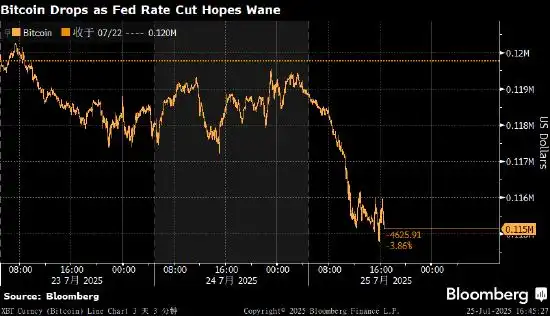
比特币走低 美国降息预期降温影响风险资产需求
全球第一大加密货币比特币价格周五走低,跟随风险资产整体跌势。对美联储降息的预期减弱,导致投资者风险偏好下降。 比特币跌至115,122美元,为7月11日以来最低水平。第二大加密货币以太坊下跌约3%,XRP下挫5.3%。 比特币在上周创下123,205美元的历史新高,驱动价格稳步上涨的因素包括对美...

超越“数字黄金”;以太坊的无限可能与蜕变之路
超越“数字黄金”:以太坊的无限可能与蜕变之路以太坊 区块链 ETH 智能合约 DeFi NFT Web3 权益证明目录· 以太坊:不仅仅是数字货币,更是全球计算机· 以太坊、以太币与 ETH:概念辨析· 智能合约的魔力:自动化信任的基石· 以太坊的“进化论”:...
FTX USDT提现手续费全面解析
FTX USDT提现手续费全面解析(2025年最新版)更新时间:2025年8月1日在加密货币交易中,提现手续费是投资者必须考虑的重要成本因素。本文将以FTX交易所的USDT提现为例,详细解析当前费率结构、影响因素以及优化策略,帮助用户降低交易成本。一、FTX USDT提现基础费率截至2025年8月,...
模拟炒币的意义在哪儿?虚拟货币交易模拟的价值解析
模拟炒币的本质与概念模拟炒币,或称虚拟货币模拟交易,是指投资者在不使用真实资金的情况下,通过专门的交易平台模拟真实加密货币市场的交易环境和操作流程。这类平台通常提供虚拟账户和虚拟资金,同时接入真实的市场行情数据,让用户能够体验从下单到平仓的完整交易过程,而无需承担任何财务风险。从本质上讲,模拟炒币是...

欧易官方网站入口 OKX欧易注册登陆入口以及App下载中心
在全球数字货币交易平台中,欧易(OKX) 凭借强大的技术实力、完善的产品矩阵与严格的安全保障,早已成为广大用户信赖的加密资产交易平台。无论你是新手入门还是专业投资者,选择欧易官方网站入口,即可轻松开启一站式数字资产服务体验。本篇文章将详细介绍: 欧易OKX官网网页版登陆与注册入口...

外汇交易还是加密货币;一场关于风险、回报与自由的抉择
外汇交易还是加密货币:一场关于风险、回报与自由的抉择标签: 外汇交易 加密货币 投资指南 风险管理 市场分析目录:· 序章:两种世界的十字路口· 外汇交易:流动性与杠杆的华尔街游戏· 加密货币交易:波动性与潜力的数字冒险· 核心差异:稳定、监管与自由·&nbs...