

How to Transfer Crypto from Binance to Gugu Wallet: A 2024 Step-by-Step Guide

In the fast-evolving world of cryptocurrency, knowing how to securely move your assets between platforms is a fundamental skill. Whether you're seeking enhanced security, exploring DeFi opportunities, or simply consolidating your holdings, transferring crypto from a major exchange like Binance to a self-custody wallet like Gugu Wallet is a common and crucial process. This comprehensive guide will walk you through every step, highlighting best practices to ensure a smooth and secure transfer of your digital wealth.
Why Move Your Crypto from Binance to Gugu Wallet?
Before diving into the "how," it's essential to understand the "why." Leaving funds on a centralized exchange like Binance is convenient for active trading, but long-term storage in a personal wallet like Gugu Wallet offers significant advantages. The core principle is "Not your keys, not your crypto." When your assets are on an exchange, the platform controls the private keys. Gugu Wallet, as a non-custodial wallet, gives you full control and ownership of your private keys, meaning you have complete sovereignty over your funds without relying on a third party. This move significantly enhances security against potential exchange hacks, provides access to a broader ecosystem of decentralized applications (dApps), and allows for direct participation in DeFi protocols, staking, and NFT marketplaces that are often integrated directly within wallet interfaces.
Step 1: Preparing for the Transfer - Setup and Verification
A successful transfer hinges on meticulous preparation. First, ensure you have both your Binance account and your Gugu Wallet app installed and set up. If you haven't created a Gugu Wallet, download it from the official app store or its official website to avoid phishing scams. During setup, you will be given a Secret Recovery Phrase (or seed phrase). Write this down on paper and store it in multiple secure, offline locations. This phrase is the master key to your wallet and all funds within it; never share it with anyone or store it digitally. Next, verify that you have a small amount of the native blockchain token (e.g., BNB for BEP-20 network, ETH for ERC-20, MATIC for Polygon) in your Gugu Wallet to cover network transaction fees (gas fees), which are required for receiving and managing assets.
Step 2: Finding Your Gugu Wallet Deposit Address
The destination for your transfer is your unique Gugu Wallet public address. Open your Gugu Wallet app and select the cryptocurrency you wish to receive, for example, USDT (Tether). Tap on the "Receive" button. The app will display a long string of letters and numbers, often accompanied by a QR code. This is your public address. It is crucial to double-check that you have selected the correct asset and, more importantly, the correct network. Gugu Wallet supports multiple networks, and sending funds on the wrong network is a common and often irreversible mistake. Always confirm the network (e.g., BSC, Ethereum, Polygon) with the sender.
Step 3: Executing the Withdrawal on Binance
Now, log in to your Binance account. Navigate to your "Wallet" and click on "Fiat and Spot." Find the cryptocurrency you want to withdraw (e.g., USDT) and click "Withdraw." You will be presented with a withdrawal form. Here, you need to paste the Gugu Wallet deposit address you copied in the previous step. The next critical step is selecting the network. This must match the network you selected in your Gugu Wallet. If your Gugu Wallet address is on the BSC (BEP-20) network, you must select "BSC (BEP20)" on Binance. Selecting an incompatible network, like sending a BEP-20 asset to an ERC-20 address, will result in the permanent loss of your funds.
Step 4: Double-Checking Details and Confirmating the Transaction
Before hitting the final confirmation button, perform the "Triple-Check": verify the recipient wallet address character-by-character, confirm the chosen withdrawal network for both sending and receiving ends, and review the withdrawal amount and the associated transaction fee. Binance will display the fee, which is paid to the network validators, not to Binance or Gugu Wallet. Once you are 100% certain all details are correct, authorize the withdrawal using your 2-Factor Authentication (2FA). The transaction will then be broadcast to the blockchain.
Step 5: Tracking the Transaction and Receiving Funds
After confirmation, the transfer is not instantaneous. It requires time for the blockchain to process the transaction. Binance will provide you with a Transaction ID (TXID). You can copy this TXID and paste it into a blockchain explorer like BscScan.com (for BSC network) or Etherscan.io (for Ethereum) to track its progress in real-time. The funds should appear in your Gugu Wallet once the network confirms the transaction, typically within a few minutes, though times can vary based on network congestion.
Common Mistakes to Avoid When Transferring from Binance to Gugu
Avoiding errors is paramount in crypto transfers. The most catastrophic mistake is using the wrong network, as mentioned. Another common pitfall is sending an unsupported token to your Gugu Wallet; always check if the specific token is supported on the chosen network. Neglecting to include gas fees for the destination network can leave your received assets stuck and unmovable. Finally, falling for phishing attacks by entering your seed phrase on a fake website is a constant threat. Always use official links and never share your recovery phrase.
Binance to Gugu Wallet: Security Best Practices for 2024
Security should be your top priority. Beyond safeguarding your seed phrase, always enable all available security features on both Binance and your Gugu Wallet, including 2FA and transaction whitelisting. Consider conducting a small test transaction with a minimal amount first, especially when transferring a large sum for the first time. This verifies that the entire process works correctly and provides peace of mind. Regularly update your wallet app and keep yourself informed about the latest security threats in the crypto space.
Conclusion: Taking Control of Your Crypto Assets
Successfully transferring your cryptocurrency from Binance to your Gugu Wallet is a empowering step towards true financial independence in the digital age. By following this detailed, step-by-step guide and adhering to security best practices, you can confidently and safely move your assets. This process not only secures your investment but also unlocks the full potential of the decentralized web, putting you in the driver's seat of your financial future. Remember, in the world of crypto, caution and verification are your best allies.
“How to Transfer Crypto from Binance to Gugu Wallet: A 2024 Step-by-Step Guide” 的相关文章

MANTRA (OM);从深渊到曙光,46% 飙升的背后
MANTRA (OM):从深渊到曙光,46% 飙升的背后标签:加密货币, 区块链, RWA, MANTRA, OM, 价格预测, 市场分析目录· 迷雾散尽:MANTRA (OM) 走出低谷· 交易狂潮:OM 如何从崩溃中崛起· 市场的低语:OM 能否重回巅峰?·&nbs...
高返佣数字交易所 - 最大化您的加密货币交易收益
高返佣数字交易所:最大化您的加密货币交易收益什么是高返佣数字交易所?高返佣数字交易所是指那些为交易者提供高比例手续费返还的加密货币交易平台。这类交易所通过返还部分交易手续费的方式,吸引高频交易者和量化交易团队,帮助他们降低交易成本,提高整体收益率。在竞争激烈的加密货币市场,交易手续费返佣已成为各大交...
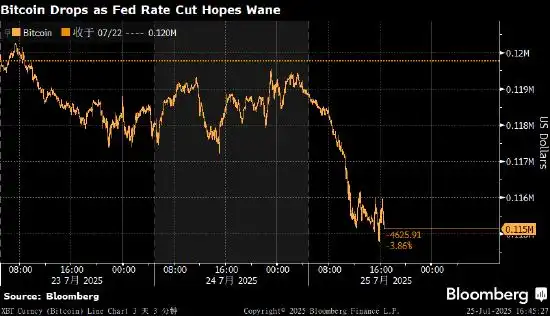
比特币走低 美国降息预期降温影响风险资产需求
全球第一大加密货币比特币价格周五走低,跟随风险资产整体跌势。对美联储降息的预期减弱,导致投资者风险偏好下降。 比特币跌至115,122美元,为7月11日以来最低水平。第二大加密货币以太坊下跌约3%,XRP下挫5.3%。 比特币在上周创下123,205美元的历史新高,驱动价格稳步上涨的因素包括对美...
BTC价格预测:方法与市场因素分析
BTC价格预测:方法与市场因素分析预测方法影响因素预测模型预测准确性实用工具比特币价格预测的主要方法比特币价格预测主要分为三大类方法:技术分析法:基于历史价格和交易量数据常用指标:移动平均线、RSI、MACD、布林带图表形态分析:头肩顶、双底、三角形等基本面分析法:链上数据分析:活跃地址数、哈希率、...
R38_揭秘数字世界的基石:区块链的魔力与未来
揭秘数字世界的基石:区块链的魔力与未来区块链 加密货币 比特币 以太坊 去中心化 分布式账本 Web3目录· 数字信任的基石:什么是区块链?· 区块链的内在优势:全球、开放与透明· 深入浅出:区块链的运作原理· 区块链的幕后英雄:谁创造了它?· 不止...

超越“数字黄金”;以太坊的无限可能与蜕变之路
超越“数字黄金”:以太坊的无限可能与蜕变之路以太坊 区块链 ETH 智能合约 DeFi NFT Web3 权益证明目录· 以太坊:不仅仅是数字货币,更是全球计算机· 以太坊、以太币与 ETH:概念辨析· 智能合约的魔力:自动化信任的基石· 以太坊的“进化论”:...